

THE AUDIENCE
New interns preparing for their first shift as a snorkel guide
MY RESPONSIBILITIES
Instructional Design, Performance Analysis, Action Mapping, Storyboarding, Photography & Videography, Visual Design, eLearning Development
TOOLS I USED
MindMeister, Google Docs, iSpring, ElevenLabs, Adobe Firefly, Camtasia, Premiere Pro, Claude
THE PROBLEM
Snorkel guiding is often the first role interns take on aboard this fast-paced, safety-conscious tourism boat operating on the Great Barrier Reef.
Training for the snorkel guide role is currently handled informally, usually by whichever more experienced intern is available at the time. While this allows for learning on the job, it can lead to inconsistent preparation before a first shift. Because interns are responsible for guest safety in the water, having a more consistent baseline of preparation would support both confidence and operational consistency.
THE SOLUTION
My proposed solution is a short, mobile-first microlearning experience designed to support first-shift readiness for interns in the snorkel guide role. The experience is scenario-based and immediately immerses learners in realistic situations, prompting them to make decisions and receive feedback rather than passively consume information.
The microlearning format and mobile accessibility allow interns to complete the training quickly on their own device, fitting naturally between responsibilities and immediately before their first shift on the reef.
DESIGN PROCESS
Guided by the ADDIE model, I managed every stage of this project from defining the performance gap to designing, developing, and testing the final solution.
1
Needs Analysis
I conducted a needs analysis through informal conversations with the captain, senior crew members, and interns to understand expectations for the snorkel guide role and how training currently takes place. I also observed the role in practice to identify key responsibilities, constraints, and performance demands during a typical shift.

2
Action Mapping
Working with my SME, I defined the key actions interns need to perform to be effective in the snorkel guide role. I used action mapping to identify which actions require realistic practice and where supporting information is needed, resulting in a clear performance-focused action map.

Action map identifying the critical actions and decisions required for first-shift readiness in the snorkel guide role.
Image Description: The business problem at the center of the action map reads, "interns safely guide snorkel groups independently from their first shift." The first action branch reads, "securely tie the snorkel line." The practice activities are "identify correct tie-off points" and "attach snorkel line correctly." The second action branch is "invite snorkelers to ring (high-risk first) and there are no practice activities, the info will be added to the dialogue. The third action branch says, "ensure proper gear fit & body position." The practice activities are "identify improper mask/snorkel fit" and "give correct body position instructions to snorkeler." The fourth action branch says, "guide group around the reef" and instead of practice activities there will be an info video. The fifth action branch says, "assist with pick-ups and rescues." The practice activity is "identify correct safety approach for a panicked snorkeler."
3
Design Document

I created a design document to lock in clarity before moving into storyboarding or development. The goal was alignment and scope, ensuring the problem, audience, goals, and design approach were clearly defined and approved by the SME before proceeding.

Design document used to align on scope, goals, and design approach.
4
Text-Based Storyboard
Using the content outline from the design document as a starting point, I created a detailed text-based storyboard that mapped out everything learners would see, do, and decide at each step of the experience. The learning objectives stayed visible at the top of the document throughout the process, serving as a constant filter. If a piece of content didn't tie back to a learning objective, it didn't belong.
Every interaction had to mirror a real moment of judgment or action in the snorkel guide role. Tabs, flip cards, and similar interaction types had no place here.
One significant decision involved Chapter 4, which covers what happens during a snorkel tour. Based on feedback from my LinkedIn network, I had planned to include interactive pauses in the video where learners would respond to a question before moving on. During storyboarding, I reconsidered. The snorkel guide role in this section requires ongoing awareness and response, not discrete decision points. Any interaction I could design felt forced rather than realistic, and would have felt out of place in an experience built around realistic practice. The final decision was to keep this section as a narrated video, letting the realistic footage carry the learning without adding interactions for their own sake.
5
Content Creation
Once the storyboard was complete, I had a clear picture of exactly what the experience needed. I spent a day on the reef following snorkel guides through their shifts, capturing all photos and video myself.
Most footage was shot from the snorkel guide's point of view: looking out at snorkelers, scanning the reef for tie-off points, approaching a panicked passenger. The goal was for learners to feel like they were already in the role.

Me out on the Great Barrier Reef capturing photos and videos for the project.
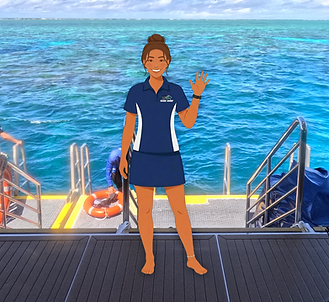
For the guide character Tilly, I used Adobe Firefly to generate an illustrated character in the boat's uniform and placed her over a real photo of the back deck, grounding the introduction in the actual environment from the start.
6
Course Development
I built this experience in iSpring Suite, a tool I was using for the first time. The iSpring Course Creation Contest provided the opportunity to learn a new authoring tool while completing the project, and the submission deadline gave me a concrete target to work toward.
I chose to build it as a scrollable course rather than a slide-based one. The design intent is for interns to complete this training on their own phones in the short windows of time between responsibilities on the boat. A scrollable format fits that context naturally, without requiring learners to navigate slides or manage a course player.

Building the scrollable course in iSpring.
iSpring's drag-and-drop interface made it straightforward to build and iterate quickly. The available interaction types covered everything this experience needed, and I appreciated that the tool didn't push me toward complexity I didn't need. That said, the tool has limitations. The most significant for me was the inability to add alt text to images, which made it difficult to design with full accessibility in mind.
7
Testing & Iteration
No learning solution is complete without being tested in the real world. I gathered feedback from interns and other crew members on the boat to evaluate whether the experience was achieving what it set out to do. That feedback informed the next iteration of this project, detailed below.
8
Second Iteration: Built in Claude Design
Using the same exact storyboard and design document, I recreated Snorkel Guide Essentials using Claude Design. Moving away from more traditional multiple choice interactions, I used AI to make the experience feel closer to what it's really like making decisions out on the boat.
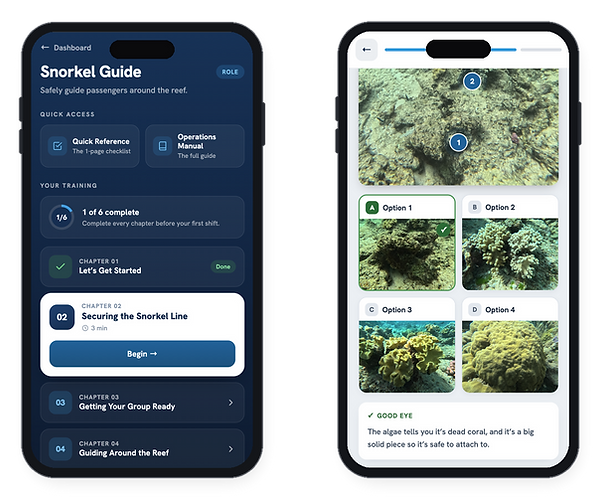
I used AI to make a full training dashboard and image-based decision-making.
In addition to the training module, I also used Claude Design to create a learning dashboard where crew members can find all of their training materials along with quick-reference guides to help them on the job.
This version is currently being tested on the boat by new interns, providing new data for how training can continue to improve in this fast-paced work environment.
RESULTS & TAKEAWAYS
What I'm most proud of in this project is how immersive it feels. From the start, the goal was to put learners in the role before they were responsible for real passengers for the first time, and I think the combination of real footage, first-person perspective, and scenario-based practice achieves that. Even where the tool introduced constraints, I was able to find solutions that kept the experience realistic and practice-focused.
This project also taught me something specific about microlearning: keeping something short is its own design challenge. Every piece of content had to earn its place. Cutting things that are interesting but not essential is harder than it sounds, and getting that right required constant reference back to the learning objectives.
After building the first version, one thing stuck with me: I wanted to move away from multiple choice as the primary interaction format. The goal was always for learners to feel like they were doing the job, not selecting answers about it.
When I rebuilt the experience with Claude, I got to do exactly that. Instead of a traditional list of answer choices, learners respond to image-based selections, which feels less like e-learning and more like making a decision on the reef.


